
If you run workloads on both Google Cloud and Oracle Cloud Infrastructure — whether through Oracle Interconnect for Google Cloud, Oracle Database@Google Cloud, or simply using both platforms side by side — you probably know the pain of dealing with multiple billing formats, portals, and reports. Comparing costs across GCP and OCI shouldn’t require spreadsheets and manual work.
I recently built a tool that solves this problem by syncing OCI billing data into BigQuery in a format that’s compatible with GCP’s own cost exports. The repo is available here: oci-focus-to-bigquery.
What is FOCUS?
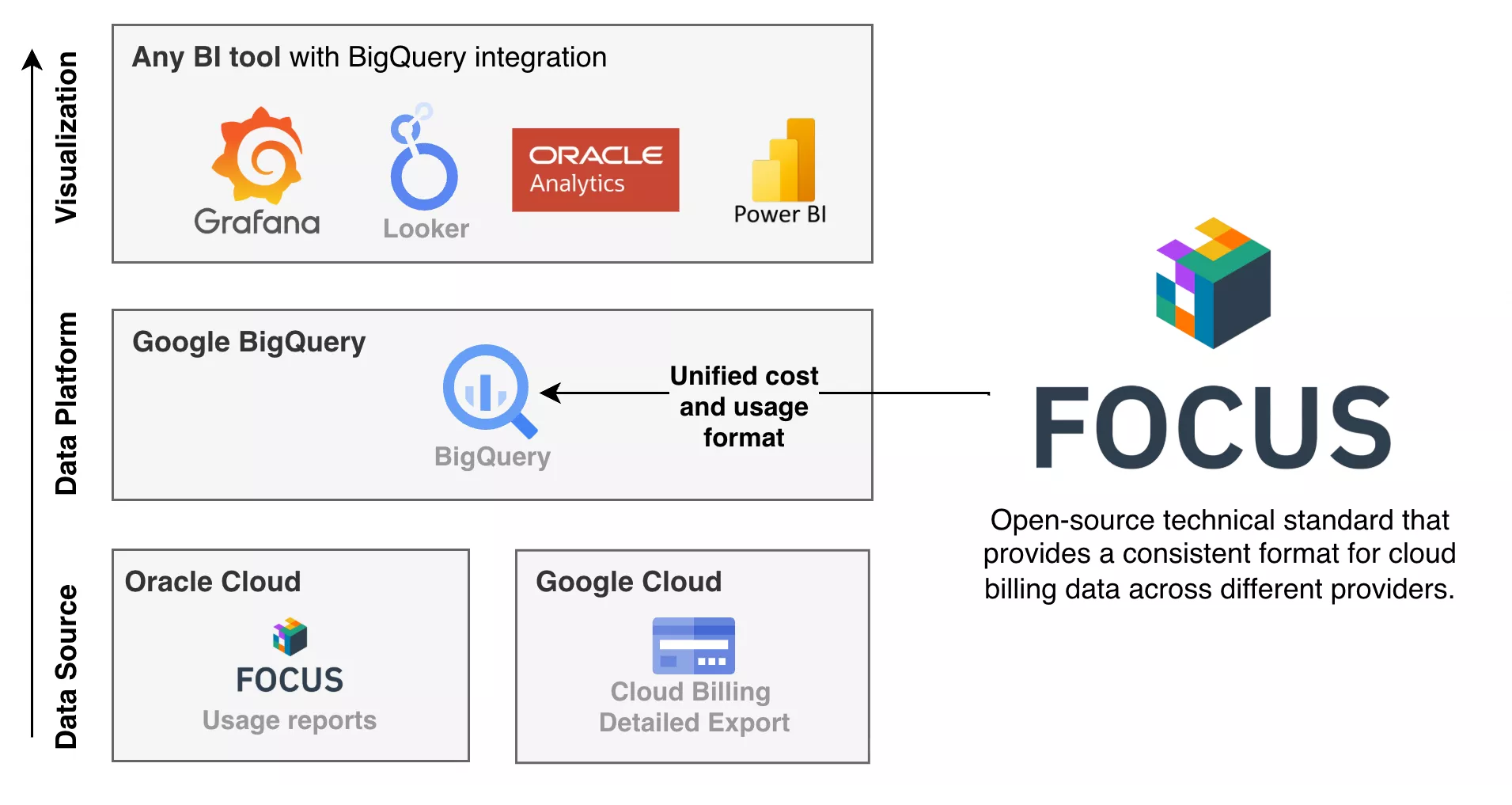
This is possible using FOCUS (FinOps Open Cost & Usage Specification). FOCUS is an open specification that defines a common schema for billing data across cloud providers. The idea is simple: instead of every cloud provider inventing their own billing format, they all export data in the same standardized format. This makes it significantly easier to compare and analyze costs across providers.
Both Oracle Cloud and Google Cloud now support FOCUS:
OCI generates FOCUS-formatted CSV cost reports automatically and stores them in an Oracle-managed Object Storage bucket. GCP offers a FOCUS BigQuery view on top of its Detailed Usage and Cloud Pricing exports. Since both sides now speak the same language, all that’s needed is a tool to bring the OCI data into BigQuery.
How it works
The tool is a TypeScript application that runs as a Google Cloud Run job. It uses rclone to sync OCI’s FOCUS cost reports from OCI Object Storage to Google Cloud Storage, transforms the flat files into a Hive-partitioned format for efficient querying, and makes them available as a BigQuery external table.
Here’s the flow in detail:
- Sync: OCI FOCUS cost reports are synced from Oracle’s Object Storage (via S3-compatible API) to a GCS staging bucket using rclone.
- Transform: The synced CSV files are reorganized into a Hive-partitioned directory structure (
year=YYYY/month=MM/), which enables BigQuery to efficiently query only the relevant partitions. - Query: A BigQuery external table is created on top of the Hive-partitioned data. The schema renames a few columns (
Provider →ProviderName,Publisher →PublisherName,Region →RegionId) to align with GCP’s FOCUS column names.
The tool supports both full and incremental sync modes. In incremental mode, only the last N days (configurable, default 7) are processed, which is the recommended mode for scheduled daily runs.
Setting it up
Prerequisites on OCI
You’ll need a service user with an API key and the following IAM policies:
define tenancy usage-report as ocid1.tenancy.oc1..aaaaaaaaned4fkpkisbwjlr56u7cj63lf3wffbilvqknstgtvzub7vhqkggq
endorse group read-usage-report-group to read objects in tenancy usage-report
Allow group read-usage-report-group to manage usage-report in tenancy
Note: the tenancy OCID above is an Oracle-managed tenancy that hosts the usage data, don’t change it.
For more details on accessing OCI cost reports, see the OCI Cost Reports documentation.
Prerequisites on GCP
On the Google Cloud side, you need the Detailed Usage Export and the Cloud Pricing Export enabled to get GCP’s own FOCUS data into BigQuery. The repo includes a focus-gcp.md file with more details on this setup.
Running locally
Getting started locally is straightforward:
# Configure rclone with your OCI and GCS credentials
cp rclone.conf.example rclone.conf

# Configure environment variables
cp .env.example .env

# Build and run with Docker
docker build -t oci-focus-sync .
docker run --env-file .env \
  -v $(pwd)/rclone.conf:/app/rclone.conf:ro \
  -v $GOOGLE_APPLICATION_CREDENTIALS:/app/gcp-key.json:ro \
  -e GOOGLE_APPLICATION_CREDENTIALS=/app/gcp-key.json \
  oci-focus-sync
I’d recommend starting with DRY_RUN=true to verify everything looks correct before actually syncing data.
Deploying to Cloud Run
For production, you can deploy the tool as a scheduled Cloud Run job. GCP credentials are picked up automatically from the Cloud Run service account, so there’s no need to manage key files.
# Build and push
gcloud builds submit --tag gcr.io/PROJECT_ID/oci-focus-sync

# Create Cloud Run job
gcloud run jobs create oci-focus-sync \
  --image gcr.io/PROJECT_ID/oci-focus-sync \
  --set-env-vars "OCI_TENANCY_OCID=ocid1.tenancy...,GCS_STAGING_BUCKET=...,GCS_HIVE_BUCKET=...,GCS_PROJECT_ID=...,SYNC_MODE=incremental,DRY_RUN=false" \
  --region europe-west1

# Schedule daily execution
gcloud scheduler jobs create http oci-focus-sync-daily \
  --location europe-west1 \
  --schedule "0 6 * * *" \
  --uri "https://europe-west1-run.googleapis.com/apis/run.googleapis.com/v1/namespaces/PROJECT_ID/jobs/oci-focus-sync:run" \
  --http-method POST \
  --oauth-service-account-email PROJECT_NUMBER-compute@developer.gserviceaccount.com
The Dockerfile bakes the rclone.conf into the image for simplicity. For production use, consider storing it in Secret Manager and mounting it as a volume instead.
Querying unified cost data
Once the BigQuery external table is set up (using the included bq_table_def.json), you can query OCI and GCP costs together:
SELECT ProviderName, SUM(BilledCost) as total_cost
FROM (
  SELECT ProviderName, CAST(BilledCost AS FLOAT64) as BilledCost
  FROM `DATASET.gcp_focus_reports`
  UNION ALL
  SELECT ProviderName, BilledCost
  FROM `DATASET.oci_focus_reports`
)
GROUP BY ProviderName
For dashboards in Looker Studio or Grafana, the repo also includes a unified view definition that combines both data sources with a consistent schema. This makes it easy to build a single dashboard that covers all your cloud spend.
Wrapping up
Multi-cloud cost visibility shouldn’t be painful. With FOCUS, both OCI and GCP now export billing data in a compatible format, and this tool bridges the gap by bringing OCI’s data into BigQuery where it can be queried alongside GCP costs.
The repo is open source (MIT license) and available on GitHub: m1nka/oci-focus-to-bigquery. Contributions and feedback are welcome.
You can also leave your feedback below in the comment section. Cheers.