
This article provides some tips on how to troubleshoot outbound network connectivity from an Oracle Autonomous AI Database (ADB-S) instance with Oracle Database@Azure and Oracle Database@Google Cloud. For example, perhaps you need an outbound private connection from ADB-S to mount an NFS share or you want to connect to Azure Blob. Troubleshooting can sometimes be difficult, because ADB-S does not expose the operating system, limiting the diagnostic tools and methods available to verify connectivity to external endpoints.
Part 1 of this article series covers the connectivity in the opposite direction, e.g. from a VM or an on-premise client to ADB-S.
Architecture overview
For this article, we assume you are using the networking option Private endpoint access only with the ADB-S instance. This means the Autonomous AI Database is only reachable on a private endpoint (PE) within your Vnet (Azure) or VPC (Google). Please see the architecture overview below.
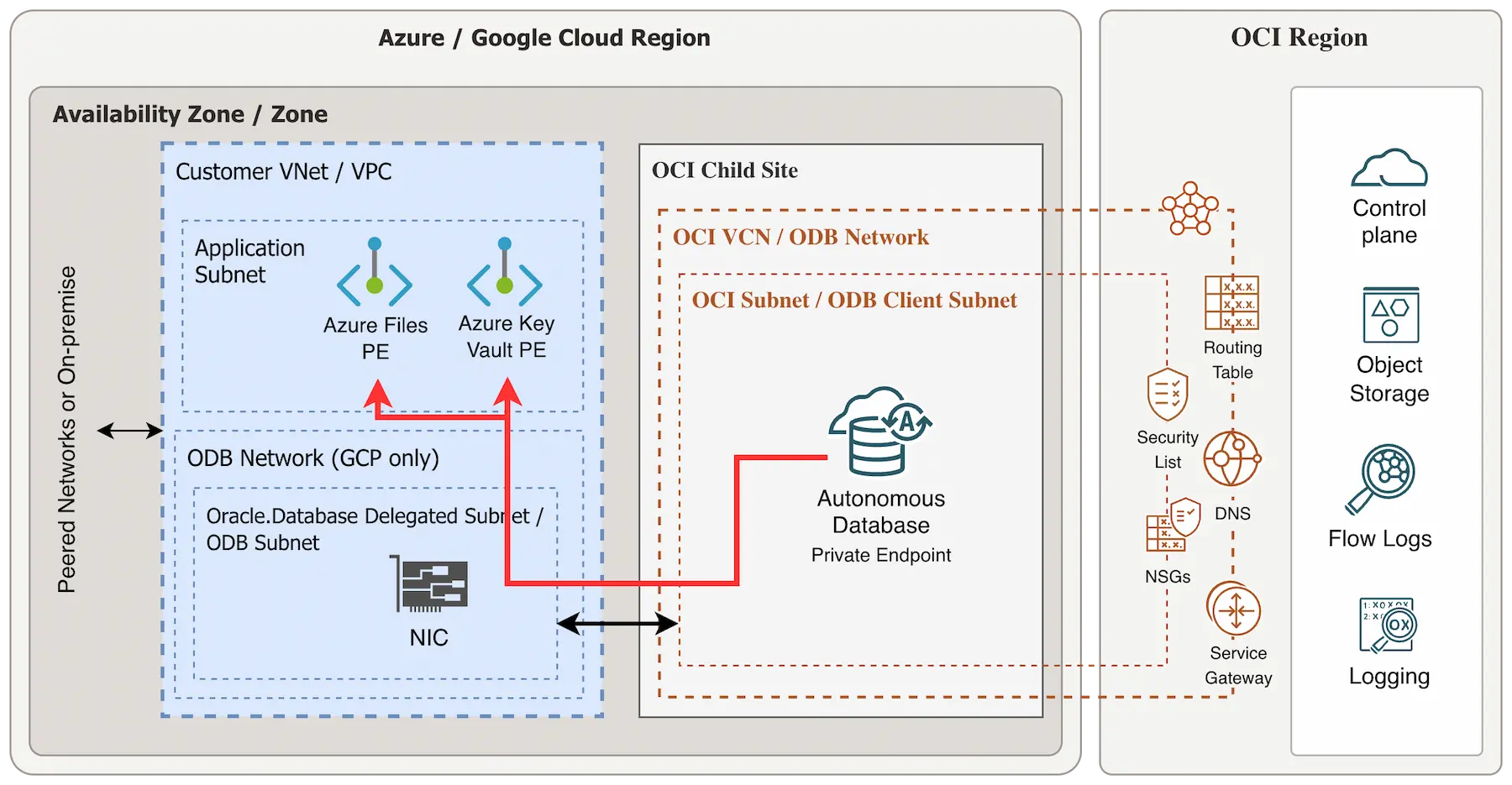
Tip for Azure: It is highly recommended to activate Advanced Networking on your Azure subscription before adding the Oracle.Database subnet delegation. Also check the supported network topologies and limitations without Advanced Networking.
Tip for Azure: If you don’t have Advanced Networking enabled, I recommend to check out this blog article when choosing NFS share and network topology.
Debugging connections from Autonomous DB
Use case: You need an outgoing connection from ADB-S to Azure Blob, mounting an NFS share or you want to integrate ADB-S with Azure Key Vault.
- Configure DNS: ADB-S uses the FQDN to connect to a target.
- Route outbound connections: Route outbound connections privately.
- Open ACLs: Create Access Control Lists on ADB-S instance.
- Check firewall settings: Make sure traffic is allowed to your target.
- Testing: How to test the connection?
1. Configure DNS for your Autonomous DB
Make sure the ADB-S instance can resolve the FQDN of your target. Typically, you need to configure DNS on the OCI private resolver, but there are other DNS options available as well.
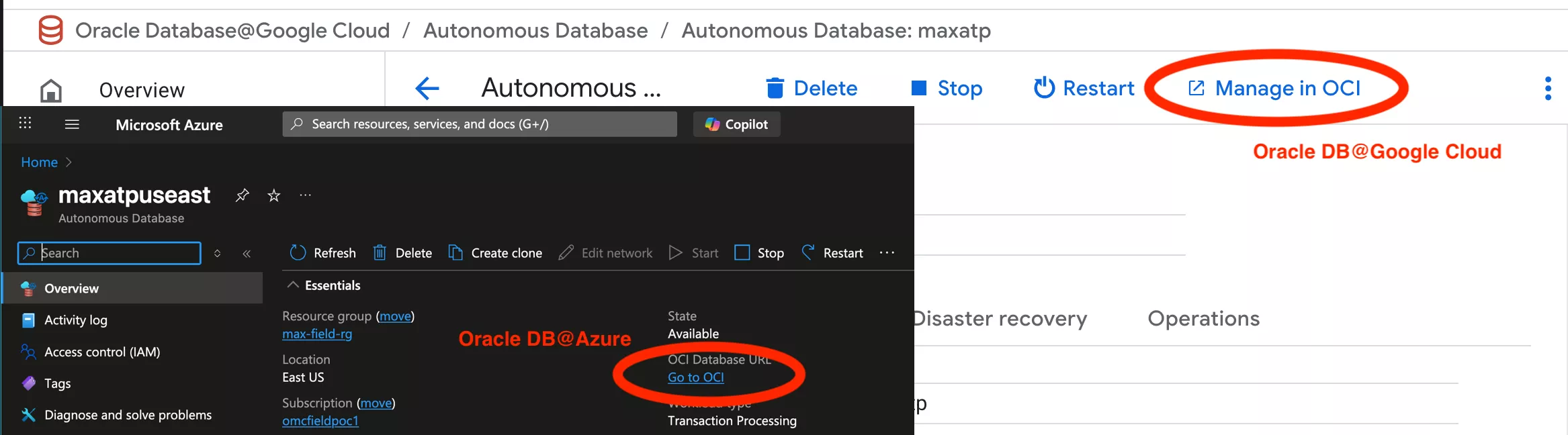
Go to your ADB-S instance in Azure/Google and click Go to OCI (Azure) or Manage in OCI:
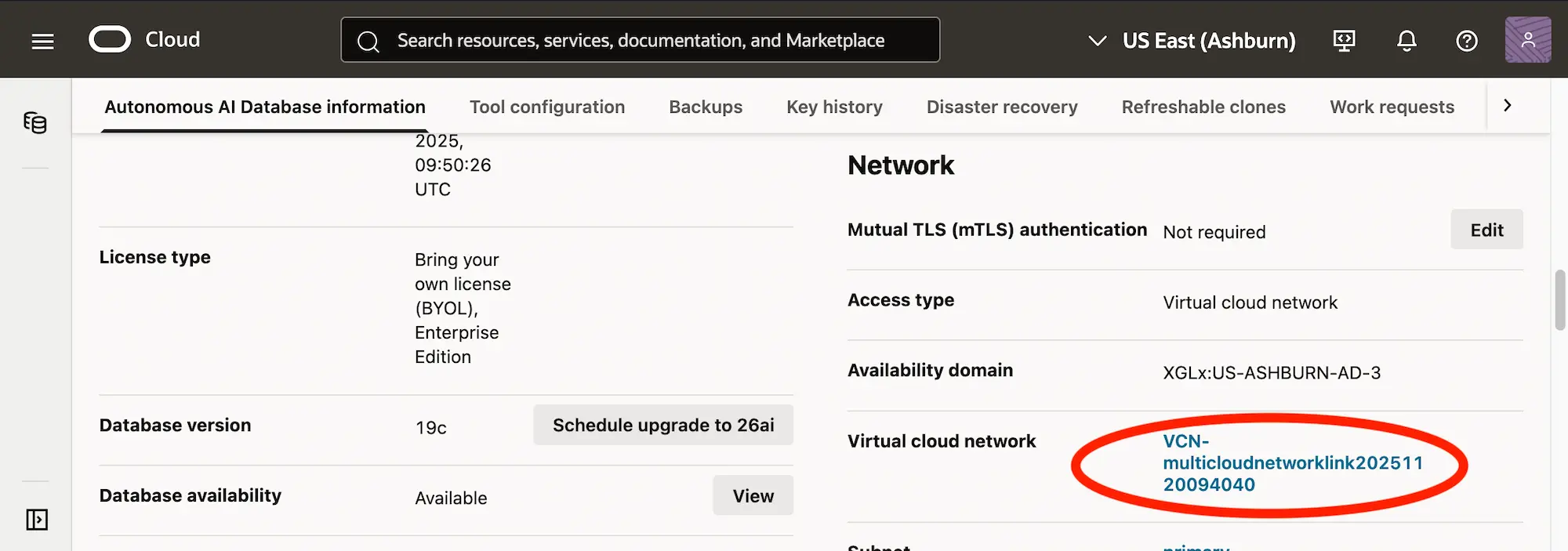
In the networking section, select your Virtual Cloud Network:
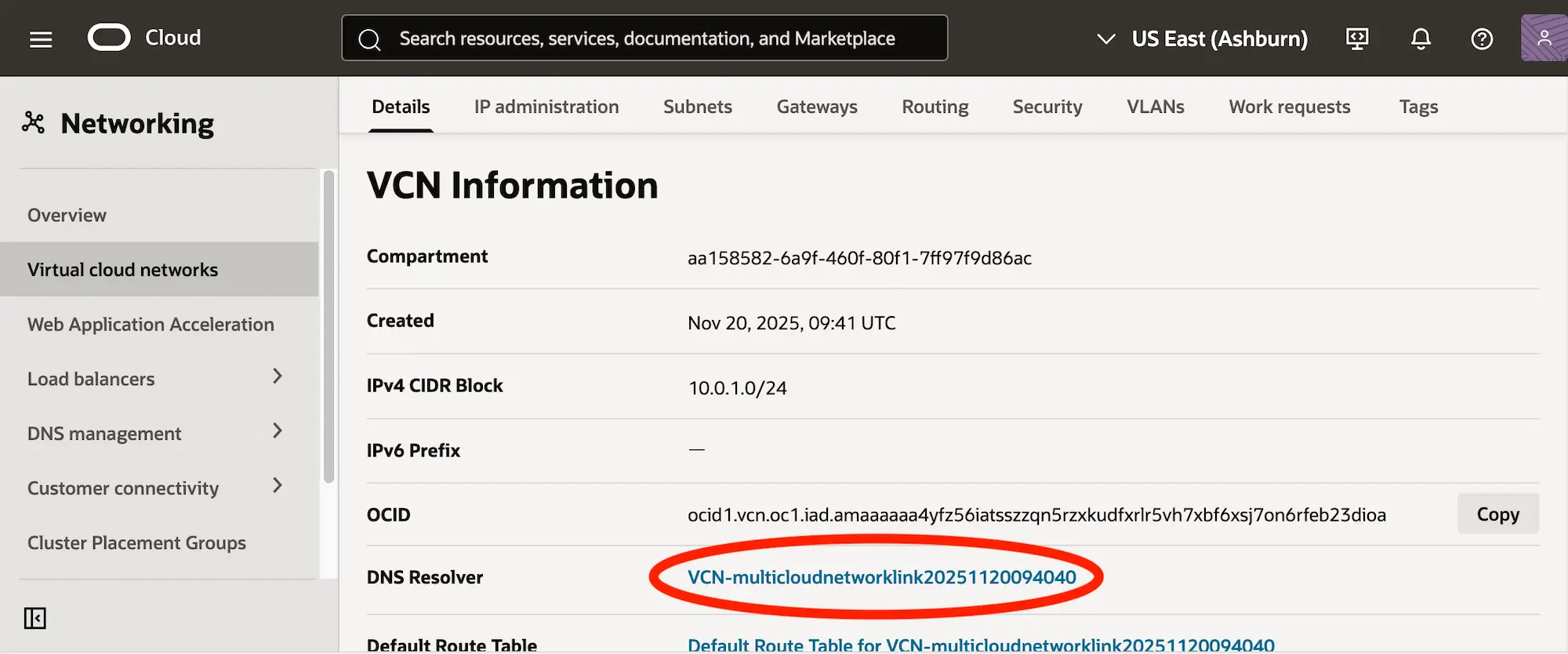
On the VCN details page, select your DNS resolver:
Select the default private view:
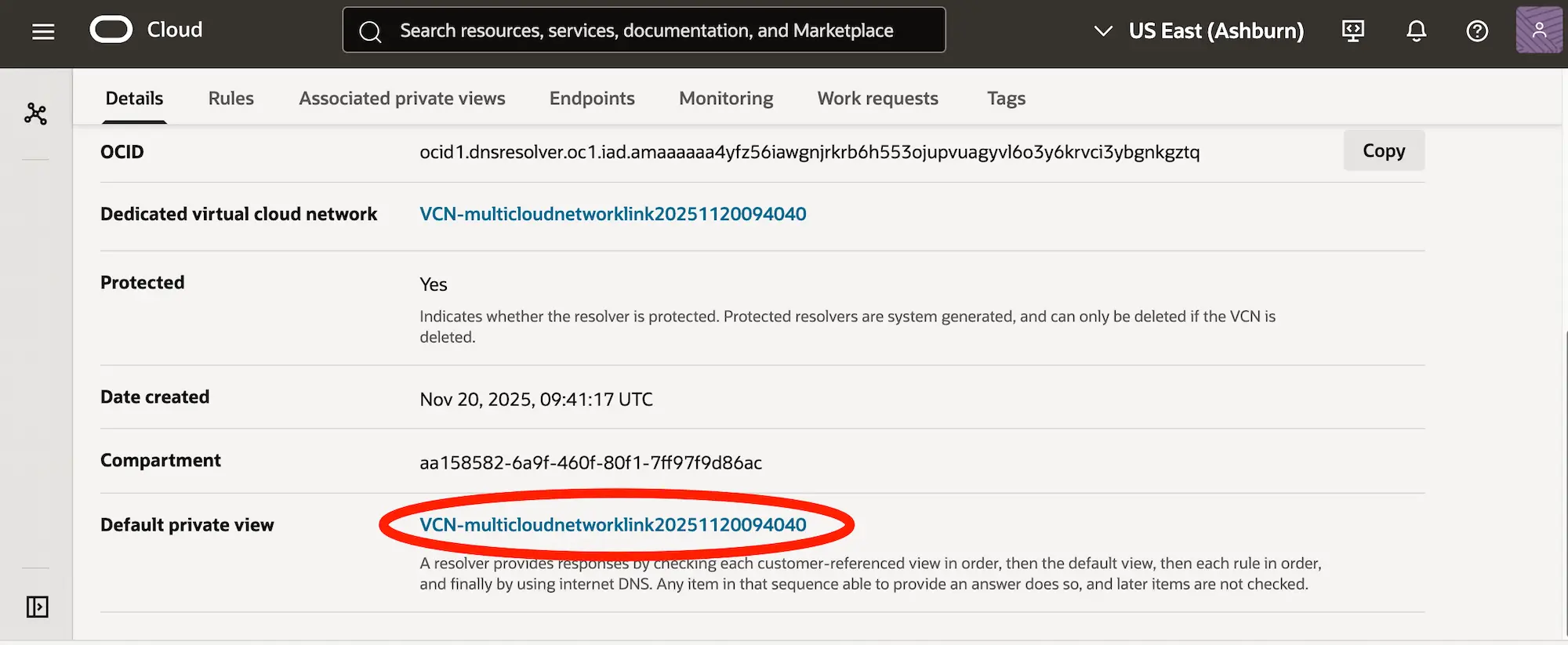
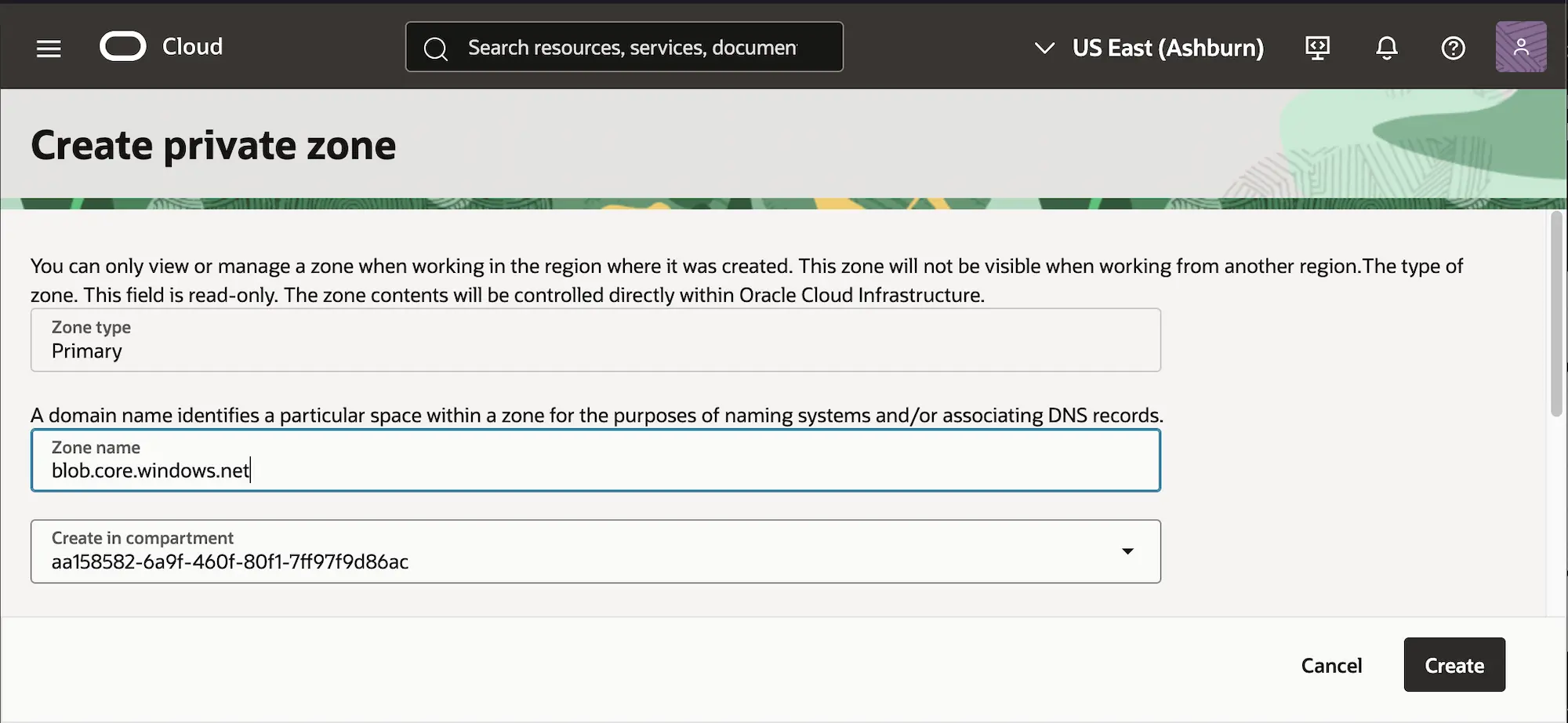
Go to the tab Private Zones and create a new private zone. For example, if you want to connect to maxfielduseastnfssa.blob.core.windows.net you should create the zone for blob.core.windows.net.
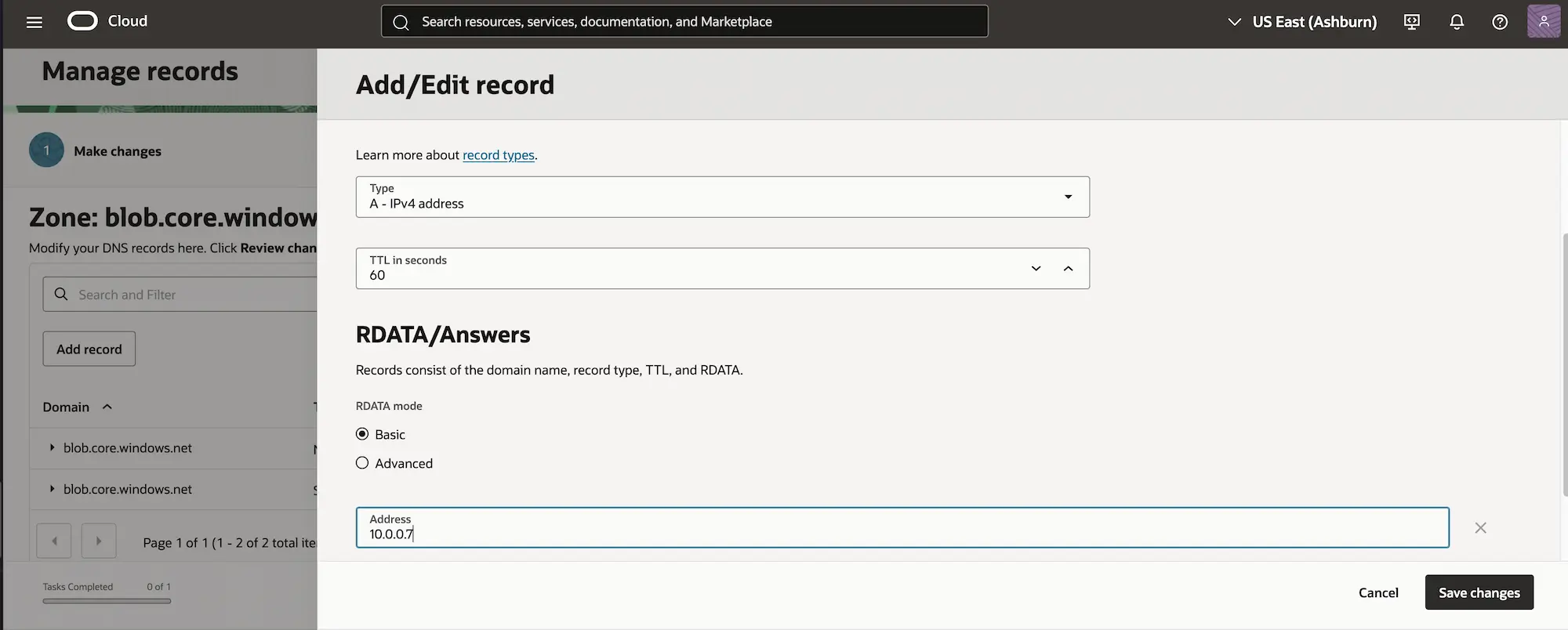
Select the newly created zone, go to tab Records and Manage records. Then, Add record with type: A - IPv4 address.
Tip: I recommend setting the TTL (Time to Live) very low, e.g. 60 or 120. It makes debugging much easier, also if you ever quickly need a configuration change, you will be able to execute it much faster.
Click Save changes, Review changes and Publish changes.
Optional: If you are working in a VCN in your Oracle Cloud home region, you can use OCI Cloud Shell with an ephemeral endpoint to execute an
nslookup to verify DNS resolution. It’s currently not possible to verify DNS outside of your home region using ADB-S. Note that private connectivity from the Cloud Shell to Azure VNets is always blocked.
2. Set outbound connections to private endpoint
ADB-S is a shared service and we need to make sure that all outgoing connectivity from the ADB-S instance is exiting privately from the Private Endpoint inside the VCN.
Connect to your Autonomous AI DB instance and set the following parameter (documented here):
ALTER DATABASE PROPERTY SET ROUTE_OUTBOUND_CONNECTIONS = 'ENFORCE_PRIVATE_ENDPOINT';
If you ever need to reset this parameter you can run ALTER DATABASE PROPERTY SET ROUTE_OUTBOUND_CONNECTIONS = '';.
3. Open ADB-S network ACLs
Connect to your Autonomous DB instance and open the networking ACLs from ADB-S (find the API reference here). You can use wildcards such as *.blob.core.windows.net too. For connecting to an NFS Share you would need resolve and connect, for integrating with an external key vault you would additionally need http:
BEGIN
    DBMS_NETWORK_ACL_ADMIN.APPEND_HOST_ACE(
        host => '*.blob.core.windows.net',
        lower_port => null,
        upper_port => null,
        ace => XS$ACE_TYPE(
            privilege_list => XS$NAME_LIST('resolve','http','connect'),
            principal_name => 'ADMIN',
            principal_type => XS_ACL.PTYPE_DB
        )
    );
END;
/
You can use this command to check the ACLs that are currently active on the ADB-S instance:
SET LINESIZE 200
SET PAGESIZE 100
SET WRAP OFF

COLUMN HOST FORMAT A40
COLUMN ACE_ORDER FORMAT 9999
COLUMN PRINCIPAL FORMAT A20
COLUMN GRANT_TYPE FORMAT A10
COLUMN PRIVILEGE FORMAT A12

SELECT HOST,
       ACE_ORDER,
       PRINCIPAL,
       GRANT_TYPE,
       PRIVILEGE
  FROM DBA_HOST_ACES
 ORDER BY HOST,
          ACE_ORDER;
4. Check Firewall Settings (NSGs)
Make sure your Network Security Groups allow outgoing traffic from the ADB-S instance to your Azure private endpoint. You need to check in both places:
- OCI NSG attached to your ADB-S instance: By default there should be an
Egress rule for destination0.0.0.0/0for all protocols. So unless this rule was changed or deleted you don’t have to configure anything. - Azure NSGs or Google VPC firewall: Also make sure to allow traffic on the Azure VNets and Google VPCs.
5. Testing the outbound connection
Now let’s test the connection!
5.1 Testing DNS resolution
You can (optionally) begin to test the private DNS resolution by running the following command:
select utl_inaddr.get_host_address('maxfielduseastnfssa.blob.core.windows.net') from dual;
Note that the address that gets returned is not the address that was resolved via DNS. Instead, if it returns an address it means that it was able to resolve the host address, if it doesn’t return an address it was not able to resolve DNS. It is just a yes-or-no-check.
This output would be an example for an unsuccessful check:
ERROR at line 1:
ORA-29257: host maxfielduseastnfssa.blob.core.windows.net unknown
ORA-06512: at "SYS.UTL_INADDR", line 19
ORA-06512: at "SYS.UTL_INADDR", line 40
ORA-06512: at line 1
And this is how it looks like after adding the DNS entry (in my case it’s 10.0.0.7), when it can resolve successfully (ignore the public URL):
UTL_INADDR.GET_HOST_ADDRESS('MAXFIELDUSEASTNFSSA.BLOB.CORE.WINDOWS.NET')
--------------------------------------------------------------------------------
254.56.129.31
Now it’s time to test your connection directly.
5.2 Testing NFS mount
To test connectivity with an NFS mount, the only option is to mount the NFS directly. Start by creating a directory:
CREATE OR REPLACE DIRECTORY MYNFS_DIR AS 'MYNFS';
Attach the file system using DBMS_CLOUD_ADMIN:
exec DBMS_CLOUD_ADMIN.ATTACH_FILE_SYSTEM(file_system_name => 'MAXFIELDUSEASTNFSSA', file_system_location => 'maxfielduseastnfssa.blob.core.windows.net:/maxfielduseastnfssa/maxcontainer', directory_name => 'MYNFS_DIR', description => 'Azure blob as nfs', params => JSON_OBJECT('nfs_version' value 3));
If the mount was successful, you should see PL/SQL procedure successfully completed. You can list the contents using SELECT * FROM TABLE(DBMS_CLOUD.LIST_FILES('MYNFS_DIR'));.
If the mount is unsuccessful, it would look something like this:
ERROR at line 1:
ORA-20000: Mounting NFS failed
ORA-06512: at "C##CLOUD$SERVICE.DBMS_CLOUD$PDBCS_251109_0", line 2251
ORA-06512: at "C##CLOUD$SERVICE.DBMS_CLOUD_ADMIN", line 5704
ORA-06512: at line 2
It will likely be related to network connectivity or NFS compatibility, also see the common issues section at the bottom.
5.3 Testing with Azure Blob
For more detailed instructions on using ADB-S with Azure Blob you can refer to this blog article, which works very well.
To test the private connectivity from ADB-S to Azure Blob, first lookup your credentials:
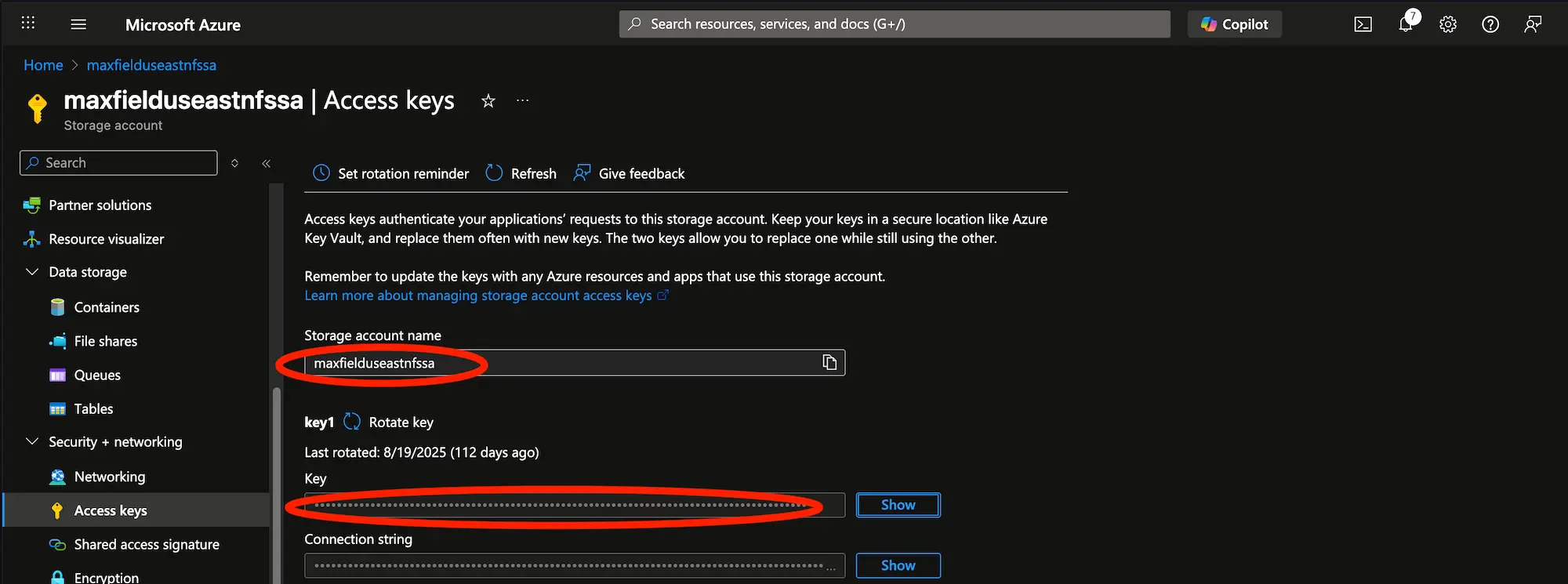
You will need the Storage account name and Key. Create the credential for Azure Blob on ADB-S like this:
EXEC DBMS_CLOUD.CREATE_CREDENTIAL(credential_name => 'BLOBCREDS', username => '<Storage account name>', password => '<Key>');
You can then use the storage account URL of the private endpoint in combination with your Storage account container name to list objects:
SELECT * FROM DBMS_CLOUD.LIST_OBJECTS('BLOBCREDS','https://maxfielduseastnfssa.blob.core.windows.net/maxcontainer/');
5.4 Testing with HTTP request
You can configure connectivity directly like desribed above, in most cases that’s the best option. However, if it does not work, you may want to test connectivity via HTTP. This can be useful, because HTTP will often provide better error messages for debugging networking issues.
- Test connectivity to Azure Key Vault Private Endpoint:
https://your-vault-pe.vault.azure.net/healthstatus - Test connectivity to Azure Blob Storage:
https://your-blob-pe.blob.core.windows.net/?restype=service&comp=properties
I recommend testing the HTTP request from a Linux machine using curl -v first, before trying from ADB-S instance using SQL like this:
SET SERVEROUTPUT ON;
SET DEFINE OFF;

BEGIN
DECLARE
    req   UTL_HTTP.REQ;
    resp  UTL_HTTP.RESP;
    name  VARCHAR2(256);
    value VARCHAR2(10024);
BEGIN
    -- Test Azure Blob Storage endpoint. Replace with any other HTTP endpoint.
    req := UTL_HTTP.BEGIN_REQUEST('https://maxfielduseastnfssas.blob.core.windows.net/?restype=service&comp=properties');
    UTL_HTTP.SET_HEADER(req, 'User-Agent', 'Mozilla/4.0');
    UTL_HTTP.SET_HEADER(req, 'x-ms-version', '2021-08-06');

    resp := UTL_HTTP.GET_RESPONSE(req);

    DBMS_OUTPUT.PUT_LINE('HTTP Status Code: ' || resp.status_code);
    DBMS_OUTPUT.PUT_LINE('HTTP Reason Phrase: ' || resp.reason_phrase);
    DBMS_OUTPUT.PUT_LINE('--- Response Headers ---');

    FOR i IN 1..UTL_HTTP.GET_HEADER_COUNT(resp) LOOP
        UTL_HTTP.GET_HEADER(resp, i, name, value);
        DBMS_OUTPUT.PUT_LINE(name || ': ' || value);
    END LOOP;

    DBMS_OUTPUT.PUT_LINE('--- Response Body ---');
    LOOP
        UTL_HTTP.READ_LINE(resp, value, TRUE);
        DBMS_OUTPUT.PUT_LINE(value);
    END LOOP;

    UTL_HTTP.END_RESPONSE(resp);
EXCEPTION
    WHEN UTL_HTTP.END_OF_BODY THEN
        UTL_HTTP.END_RESPONSE(resp);
        DBMS_OUTPUT.PUT_LINE('--- Connection Successful ---');
    WHEN OTHERS THEN
        DBMS_OUTPUT.PUT_LINE('SQLERRM: ' || SQLERRM);
        DBMS_OUTPUT.PUT_LINE('SQLCODE: ' || SQLCODE);
        DBMS_OUTPUT.PUT_LINE('DETAILS: ' || UTL_HTTP.get_detailed_sqlerrm);
        RAISE;
END;
END;
/
An unsuccessful attempt might look like this (target host or object does not exist):
SQLERRM: ORA-29273: HTTP request failed
SQLCODE: -29273
DETAILS: ORA-12545: Connect failed because target host or object does not exist
....
A successful attempt might look like this (don’t worry about the missing authentication, that’s expected):
HTTP Status Code: 401
HTTP Reason Phrase: Server failed to authenticate the request. Please refer to
the information in the www-authenticate header.
--- Response Headers ---
....
--- Response Body ---
i>?<?xml version="1.0"
encoding="utf-8"?><Error><Code>NoAuthenticationInformation</Code><Message>Server
failed to authenticate the request. Please refer to the information in the
www-authenticate header.
RequestId:fac3c660-c01e-00f7-0e23-69cafb000000
Time:2025-12-09T15:50:39.0326001Z</Message></Error>
--- Connection Successful ---

PL/SQL procedure successfully completed.
Now you know that connectivity can be established successfully.
Common issues
Advanced Networking (Azure only)
If Advanced Networking is not active on your Oracle.Database delegated subnet, it can cause issues. The only way to find out is via Microsoft SR.
NFS secure transfer (Azure only)
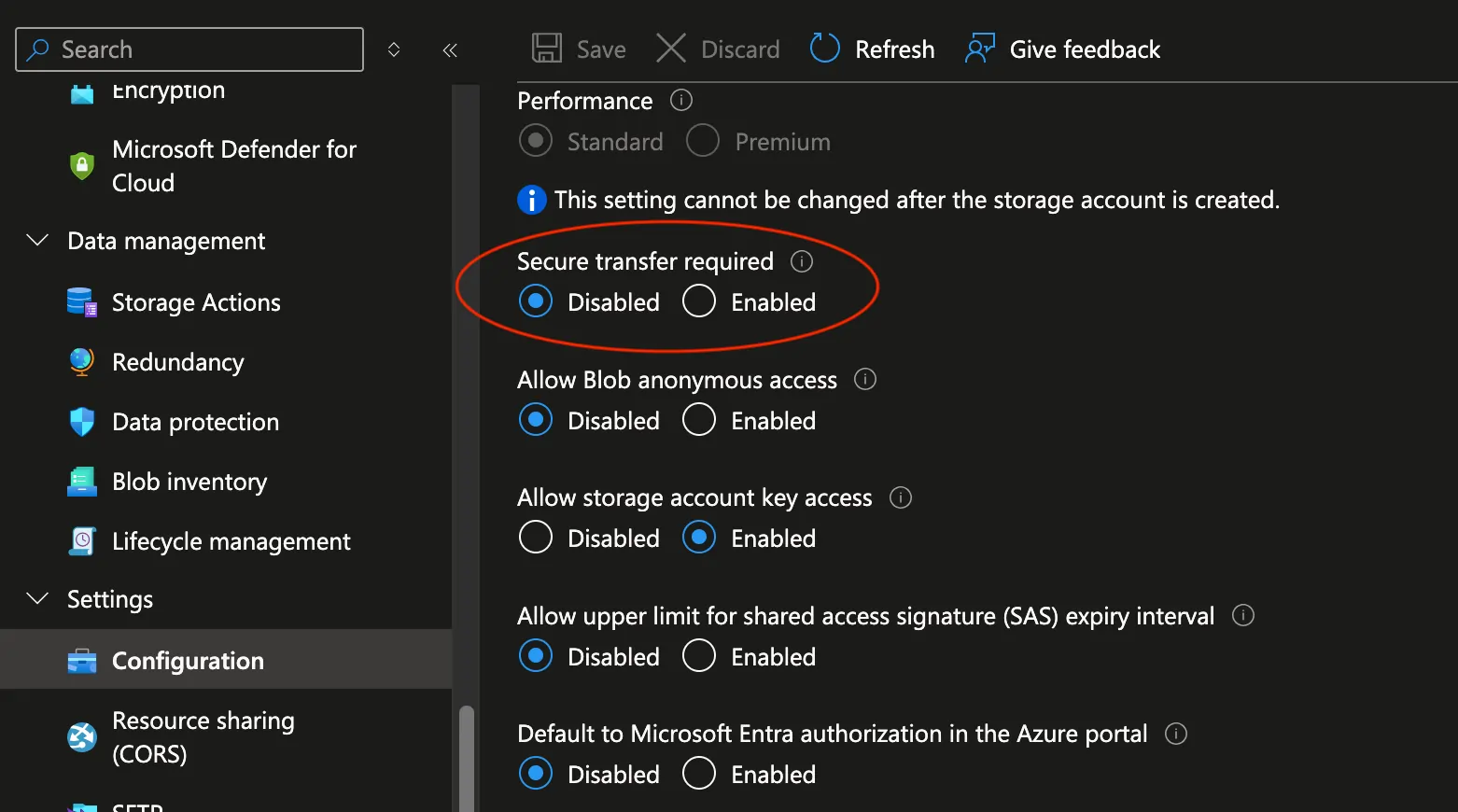
The DBMS_CLOUD_ADMIN package in Oracle Autonomous Database does not directly support the use of stunnel or TLS wrappers like aznfs uses for encrypting NFS connections. Since the traffic is already secured by staying within your private Azure network via the private endpoint, disabling this option is necessary for the connection to work. On your storage account, go to Settings -> Configuration, and disable Secure transfer required.
NFS version
Be sure to choose the right NFS version when using the DBMS_CLOUD_ADMIN command for ATTACH_FILE_SYSTEM.
DNS caching
Because ADB-S is a shared service, it’s not completely clear how the DNS caching works in the background. In addition, beware that Azure private endpoint addresses are often publicly resolvable with public IP addresses. For example when I create an Azure Key Vault with a private endpoint using emea-maxakv.vault.azure.net, which resolves to 10.0.0.11, it will also publicly resolve to a different address:
[azureuser@maxeastusvm ~]$ nslookup emea-maxakv.vault.azure.net
Server:		168.63.129.16
Address:	168.63.129.16#53

Non-authoritative answer:
emea-maxakv.vault.azure.net	canonical name = emea-maxakv.privatelink.vaultcore.azure.net.
Name:	emea-maxakv.privatelink.vaultcore.azure.net
Address: 10.0.0.11

[azureuser@maxeastusvm ~]$ exit
logout
Connection to 52.186.170.169 closed.
~ ❯ nslookup emea-maxakv.vault.azure.net
Server:		62.240.133.99
Address:	62.240.133.99#53

Non-authoritative answer:
emea-maxakv.vault.azure.net	canonical name = emea-maxakv.privatelink.vaultcore.azure.net.
emea-maxakv.privatelink.vaultcore.azure.net	canonical name = data-prod-eus.vaultcore.azure.net.
data-prod-eus.vaultcore.azure.net	canonical name = data-prod-eus-region.vaultcore.azure.net.
data-prod-eus-region.vaultcore.azure.net	canonical name = est.prd.r.kv.aadg.msidentity.com.
est.prd.r.kv.aadg.msidentity.com	canonical name = est.tm.prd.r.kv.aadg.trafficmanager.net.
Name:	est.tm.prd.r.kv.aadg.trafficmanager.net
Address: 20.42.64.44
Name:	est.tm.prd.r.kv.aadg.trafficmanager.net
Address: 20.42.73.8
Name:	est.tm.prd.r.kv.aadg.trafficmanager.net
Address: 40.71.10.202
This can cause situations where the ADB-S instance has cached a wrong entry. In these cases, unfortunately the only solution seems to be to … wait it out… and try again the next day. I would recommend following this tutorial in the right order; don’t execute any tests before configuring the private DNS and setting outbound connectivity to private. I unfortunately ran into this issue multiple times.
Conclusion
Hopefully this helped you to enable outbound connectivity. Let me know in the comments if you have any questions. Cheers!